How To
Credits and the weekly allowance
The app is free and cataloging is free. Credits exist for one reason: the AI features cost real money to run, so those, and only those, draw from a credit balance. There is no subscription and no recurring anything.
What never costs a credit
Everything answered from your own phone is free, because it never touches a server:
- Searching your collection, by text or by pointing the camera at a cover you already own.
- The do-I-own-it lookup during an evaluation, printings and conditions distinguished.
- Scanning labels: Scan a Stack, Audit Box, and label printing itself.
- Kiosk exports, auction packs, sharing, backup, and restore.
What spends credits
- Identifying a book from its photo: a credit per book.
- Ballpark price estimates, charged by the batch rather than by the book. Auto ballpark prices each book the moment it is identified, which is fast and costs more; the Ballpark button prices a finished stack in one pass for a fraction of that. Fast or thrifty is your call, made fresh on every stack, and nothing is spent until you say so.
- Advanced Grading: a few credits for the full 16-point assessment across up to eight photos.
- An on-demand Hot Books sweep, when you want the news checked right now instead of waiting for tomorrow morning. Reading the daily feed is free, and if somebody else swept the outlets a few minutes before you, the app says so and does not charge you for news already on the screen.
The weekly allowance
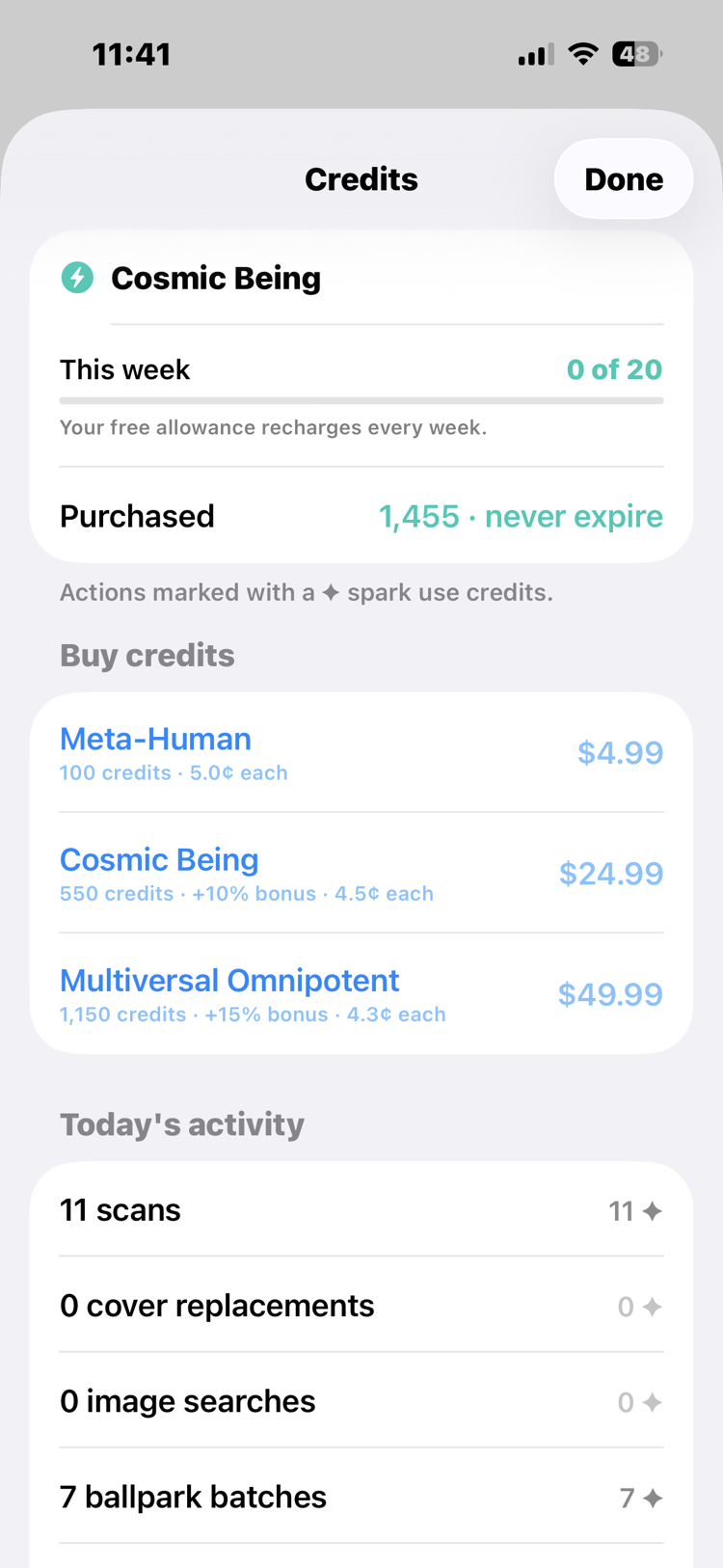
Every week you get a free allowance of credits, sized to cover casual collecting: the new books you picked up, a stack from a sale, the occasional curiosity. The allowance resets each week and does not carry over. Credits you buy are the opposite: they never expire, and they are there for the big weekends, not the everyday.
Buying packs
Credit packs are bought inside the app, through Apple. We never see your payment details or your Apple ID; Apple sends a signed confirmation of the purchase, and that confirmation reaching our server is what adds the credits. If a pack ever fails to arrive, email support with your proof of purchase (Apple's receipt email is perfect) and we will investigate and set the balance right.
The usage meter
Tap the battery in the app and the meter opens: your current balance and a recent-activity list showing exactly where your credits went, operation by operation. Actions that spend credits are marked with a spark throughout the app, so you always know before you tap. If a number ever surprises you, the answer is on that list, not in your memory.
See it in real life: watch a dealer spend nothing until it counts in The other side of the table, price a mystery pile in one pass in No deal in sight, and weigh a paid sweep against tomorrow's free one in The morning check.